v1.0 · free forever · no account

Automate skill checks
in Dandy's World.

Set up farming loops that run while you're away from your desk. The macro handles repetitive skill checks and farming sequences automatically, so you progress without grinding manually every session. Works with standard keyboard and mouse input—no game modifications needed.

No account injectionNo hidden trackingCompletely freev1.0
Runs while AFKSkill check loopsFarming automationWindows onlyFree to use
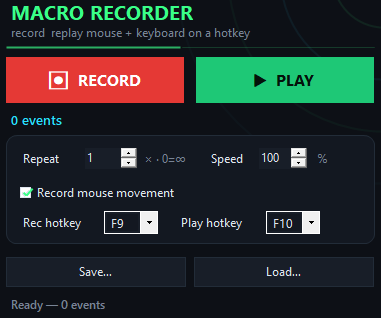
Dandy's World Macro app window on Windows
Results in action
Inside the appDandy's World Macro window

Watch your farm progress while you're not playing.

Set up a macro sequence once, then let it repeat farming loops in the background. The automation handles skill checks and resource collection at the same pace you would manually, keeping your progression steady even when you step away.

Consistent loop timingMacros repeat farming sequences at intervals you define, maintaining steady progress without lag or skipped steps.
Skill check automationDefine which checks to perform and in what order—the macro executes them in sequence without interruption.
Background operationMacros run while you browse, work, or play other games—your Dandy's World window stays in the background.
Why macros save time

Why automate your Dandy's World farming?

Manual farming takes time. Macros let you reach milestones faster while you focus on other things.

No manual repetition

You write the sequence once. After that, the macro repeats it as many times as you need. No more clicking the same buttons over and over for hours. Your hands stay free and your progress keeps moving.

Farm on your schedule

Start a macro loop in the morning and check back hours later. Your character will have completed dozens of farming cycles while you weren't watching. Time works for you instead of against you.

Built-in skill check logic

The macro understands Dandy's World's skill check mechanics and can be set to handle them automatically. You define the pattern; the program executes it flawlessly every loop.

Lightweight and reliable

No bloat, no popups asking for updates. The program runs quietly in the background and does one job well: automating your farming loops.

Getting started

Set up your first farming macro in minutes.

Getting started takes just a few steps—no coding or advanced setup required.

  1. Download and installDownload Dandy's World Macro and run the installer on your Windows PC.
  2. Open the macro editorLaunch the program and create a new macro—record your skill checks and farming sequence using the built-in recorder.
  3. Configure loop settingsSet how many times the macro should repeat and any delays between actions to match your preferred farming pace.
  4. Start farmingClick Play, switch to your Dandy's World window, and let the macro handle the farming while you do something else.
vs. manual farming

How Dandy's World Macro compares to grinding manually.

Automation saves you hours of repetitive clicking every week.

Skill check handling
Automated every time
You click each one
Time investment per loop
Set once, runs forever
Hours every session
Farming while away
Yes, in background
Not possible
Consistency
Never misses a step
Prone to mistakes
Setup difficulty
Record and configure
No setup needed
Cost
Free download
Your time
Your questions answered

Common questions about Dandy's World Macro.

Will the macro get my account banned?

Dandy's World Macro simulates normal keyboard and mouse input—it doesn't modify game files or inject code into the game. Whether automation violates the game's terms is something you should verify in the game's rules before using any macro tool.

Can I run multiple macros at once?

Yes. You can create and execute different macros for different farming sequences. Each runs independently in the background.

Do I need to keep my game window in focus?

No. Once you start a macro, you can switch to other windows or tabs. The macro continues running in the background as long as Dandy's World is launched.

How do I record a farming sequence?

Use the built-in recorder: click Record, perform your skill checks and farming actions normally, then click Stop. The macro saves every keystroke and mouse click.

Can I edit a macro after I record it?

Yes. Open any saved macro and adjust the sequence, add delays, remove steps, or change loop counts without re-recording.

What if the game updates?

Game updates don't affect the macro itself. If your farming location or skill check sequence changes, you can re-record a new macro or edit the existing one.

Is there a free trial or demo?

Dandy's World Macro is completely free. Download it, install it, and start creating macros right away—no trial period or limitations.
Start farming smarter, not harder.

Download Dandy's World Macro today and let your farming loops run on autopilot while you focus on playing, working, or anything else.

Download for Windows
Latest release · v1.0

Dandy's World Macro guides